01
Ask every question with complete context
Create numbered RFIs with question, location, discipline and background. A structured request reduces back-and-forth from the start.
Read the complete guide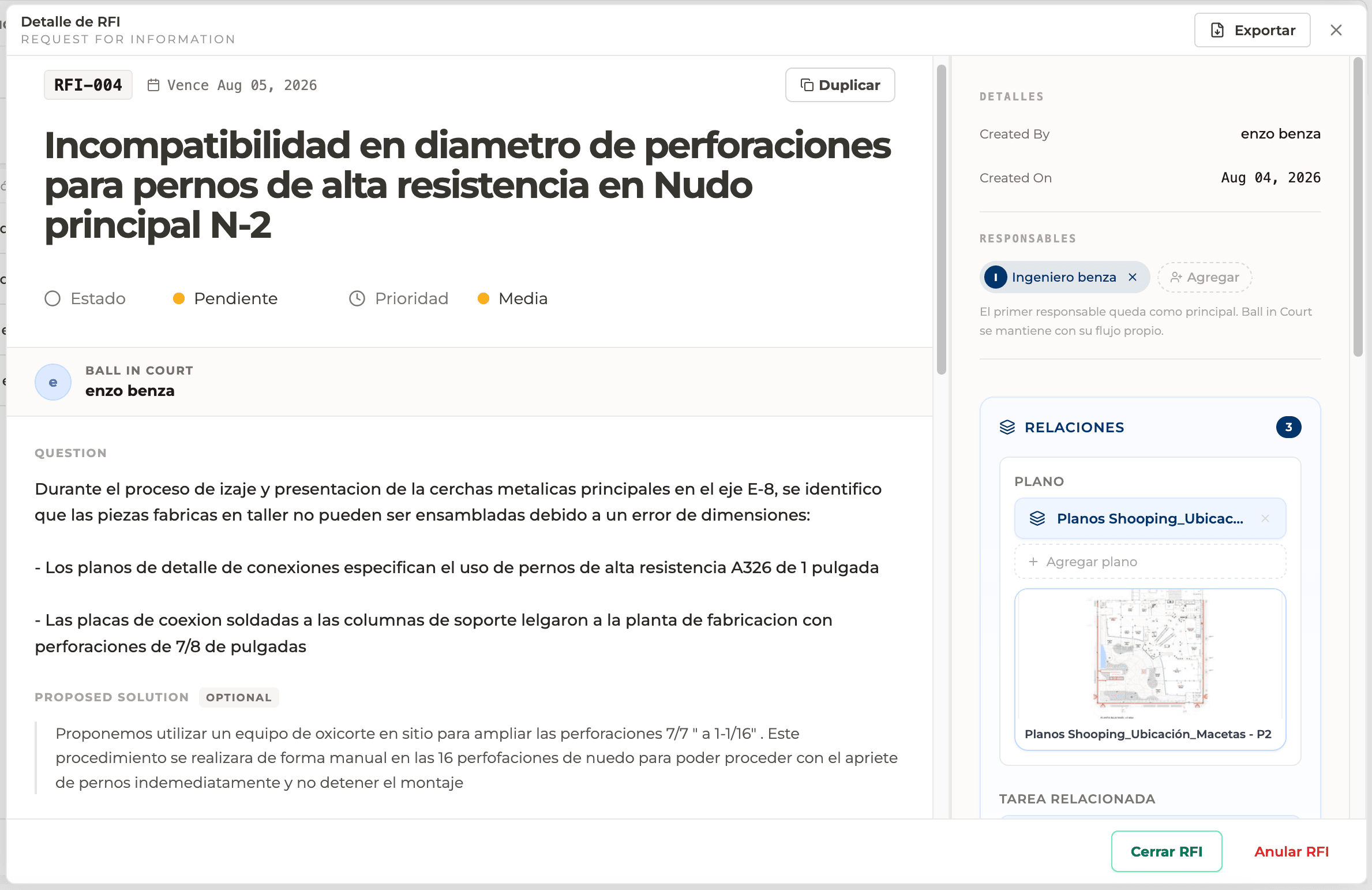
Route technical questions with ownership, cost and schedule impact traceability.
Perfour / Costanera Norte
RFIs
Every capability belongs to the same operating record: simple to execute, clear to control and connected to the rest of Perfour.
Create numbered RFIs with question, location, discipline and background. A structured request reduces back-and-forth from the start.
Read the complete guideBall-in-court shows which person or organization must respond. Ownership and due date remain visible until the request moves forward.
Read the complete guideProduct image or video
Ball-in-court
Ready for the final product capture.
Centralize clarifications, revisions and the final response in an auditable thread. The team executes from the same decision—even months later.
Read the complete guideProduct image or video
Response thread
Ready for the final product capture.
Attach relevant documents so the question can be resolved without external searching. Evidence remains linked to the RFI.
Read the complete guideNotify participants, detect overdue RFIs and prioritize those blocking work. The dashboard turns an inbox of questions into a manageable process.
Read the complete guideProduct image or video
RFI deadlines
Ready for the final product capture.
Record delay days and financial effect. The RFI connects to schedule, budget and execution to reveal its real consequence.
Read the complete guideProduct image or video
Cost and schedule impact
Ready for the final product capture.
Create an RFI from a pin to retain the exact location of the technical question.
Move Ball in Court to the next owner and distinguish comments from the official response.
An RFI formalizes a question that must be resolved before work can proceed correctly. Perfour brings together the question, location, drawing, attachments, priority, due date, ball-in-court and potential impact so the decision is not scattered across email and chat.
Records the question where it appears with a photo, drawing, location and effect on the work.
Assigns ball-in-court, monitors due dates and prioritizes requests by cost or schedule impact.
Reviews complete context and issues an official response that remains available for execution.
Describe one question with the correct location, reference and proposed solution when appropriate.
Define owner, reviewers, watchers, priority and due date so the next action is always clear.
Review drawings and files beside the request and keep comments separate from the official response.
Confirm the response is actionable, record impact and preserve history when closing, reopening or voiding.
These guides explain creation, ball-in-court, drawings, due dates, impact and closure with real examples from Perfour's RFI module.
It is a formal request for information that records a technical question, its context, who must respond, when it is due and the official answer.
It identifies the person or organization responsible for the next step. It can change during review without erasing prior accountability.
Yes. It can link drawings, files, tasks, schedules and conversations so the question and response are reviewed beside their evidence.
When an actionable official response exists, required participants have been informed and any relevant impact has been recorded.
RFIs records keep their relationships, owners, evidence and history as work moves into other modules.