Who can do what: permissions, current version and shared drawings
Which buttons work depends on your permission in the project, whether the open version is the current one and whether the drawing is yours or shared.
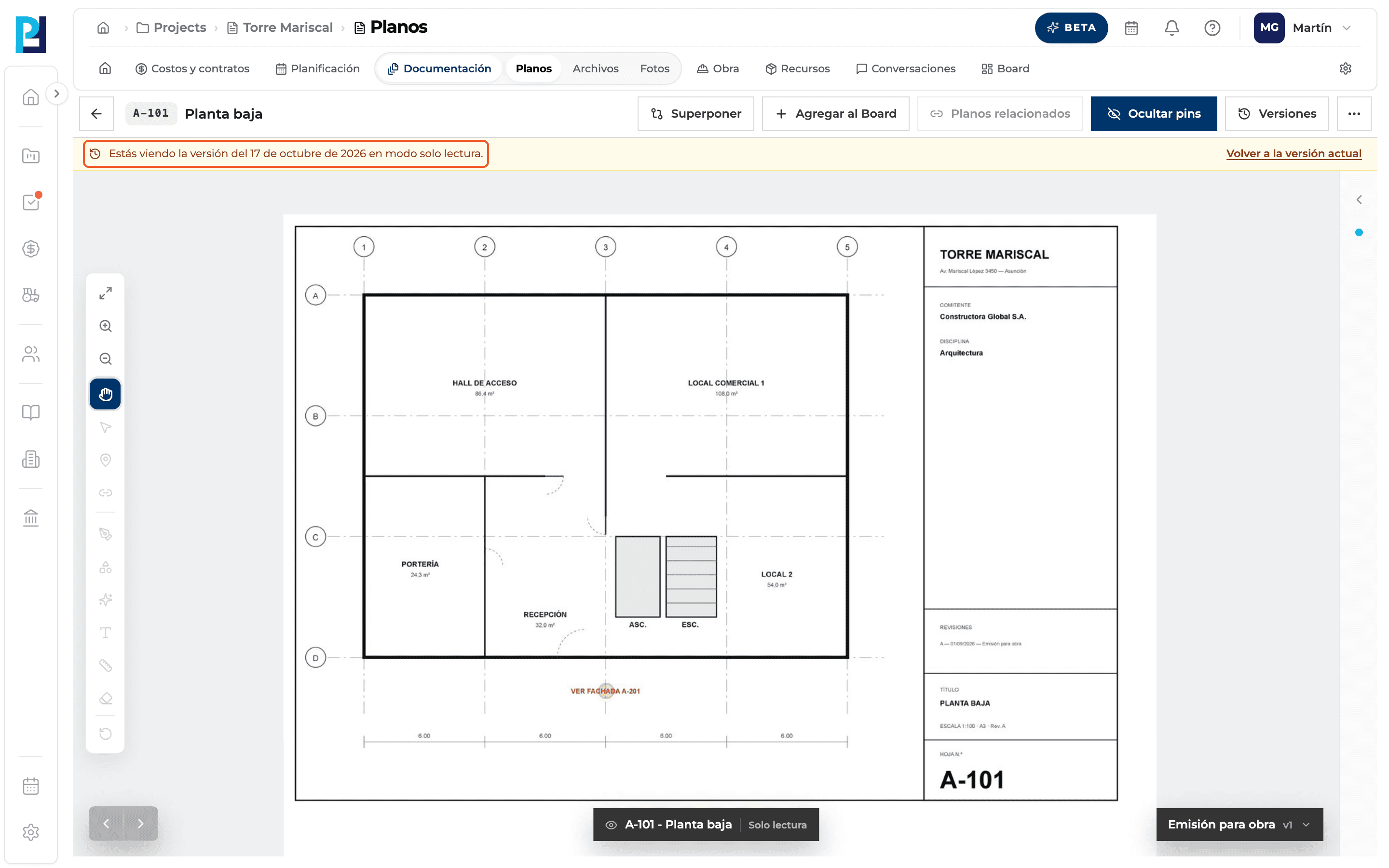
How to complete permissions
- 01
Read the version banner
On an earlier version, the amber banner says it is read-only: only Pan works, and you can view pins, compare and open another version. To mark up, use Volver a la versión actual. Viewing the module needs permission to view documents; marking up (pins, hyperlinks, drawing, measuring, editing the name) needs document upload permission and the Current version.
What you'll learn
How who can do what: permissions, current version and shared drawings works inside Perfour.
What information you need and how it stays connected to Drawings.
How to preserve traceability and find the record later.
Frequently asked questions
I see the drawing but can't draw.+
You are on an earlier version or lack upload permission.
Tools show «(próximamente)» (coming soon).+
It's the locked-tool label: the feature exists but isn't available on this version or with your permission.
What can I do with a shared drawing?+
Mark it up (with permission), overlay it, view its versions read-only and remove it from your project. You can't upload versions.
Moving or deleting is rejected.+
The server checks those actions against your role; its error message is shown.