Learn Perfour. Find an answer.
Explore every Perfour feature and learn each workflow with tutorials and videos. Search for the process you need to solve and go directly to its explanation.
Filter by module
Step-by-step tutorials
108 results
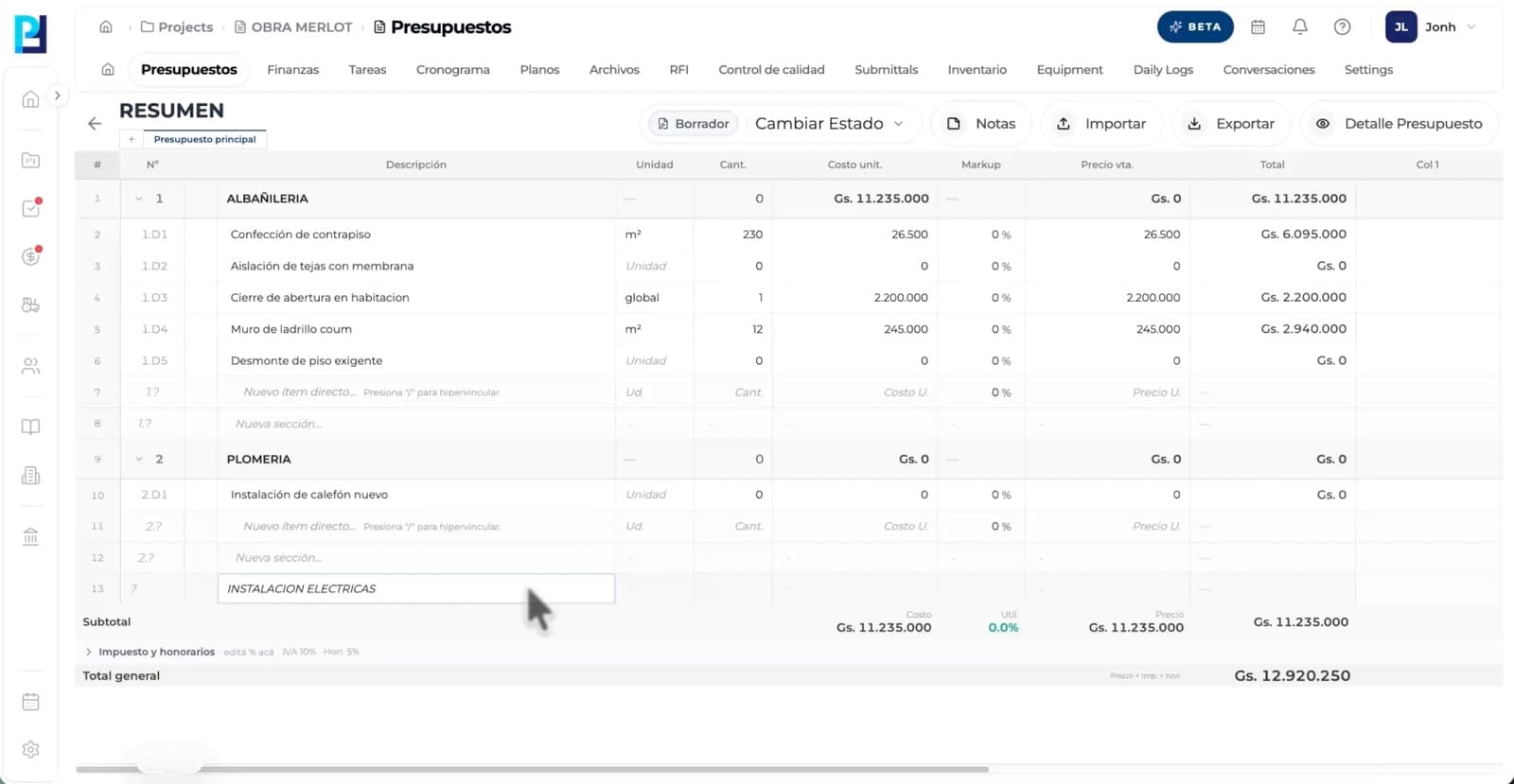
How to use: Budget builder
Organize chapters, sections and line items in a clear, reusable hierarchy. Start from a familiar structure, duplicate previous budgets and keep quantities, units, prices and owners in one place.
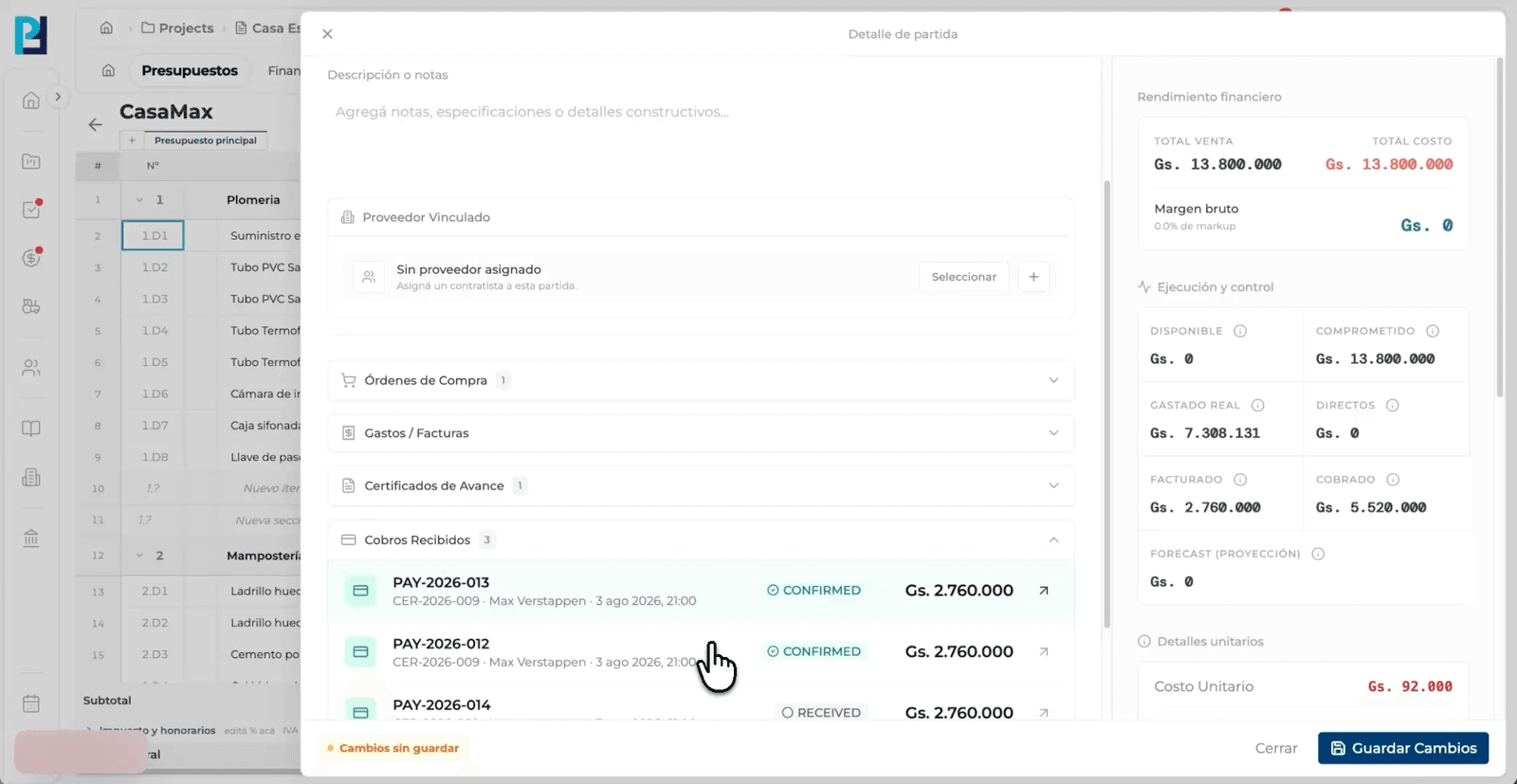
How to use: Line-item history
A budget item is no longer an isolated row. Follow it from its approved value through purchase orders, suppliers, receipts, expenses, progress certificates and payments without losing the origin of each movement.
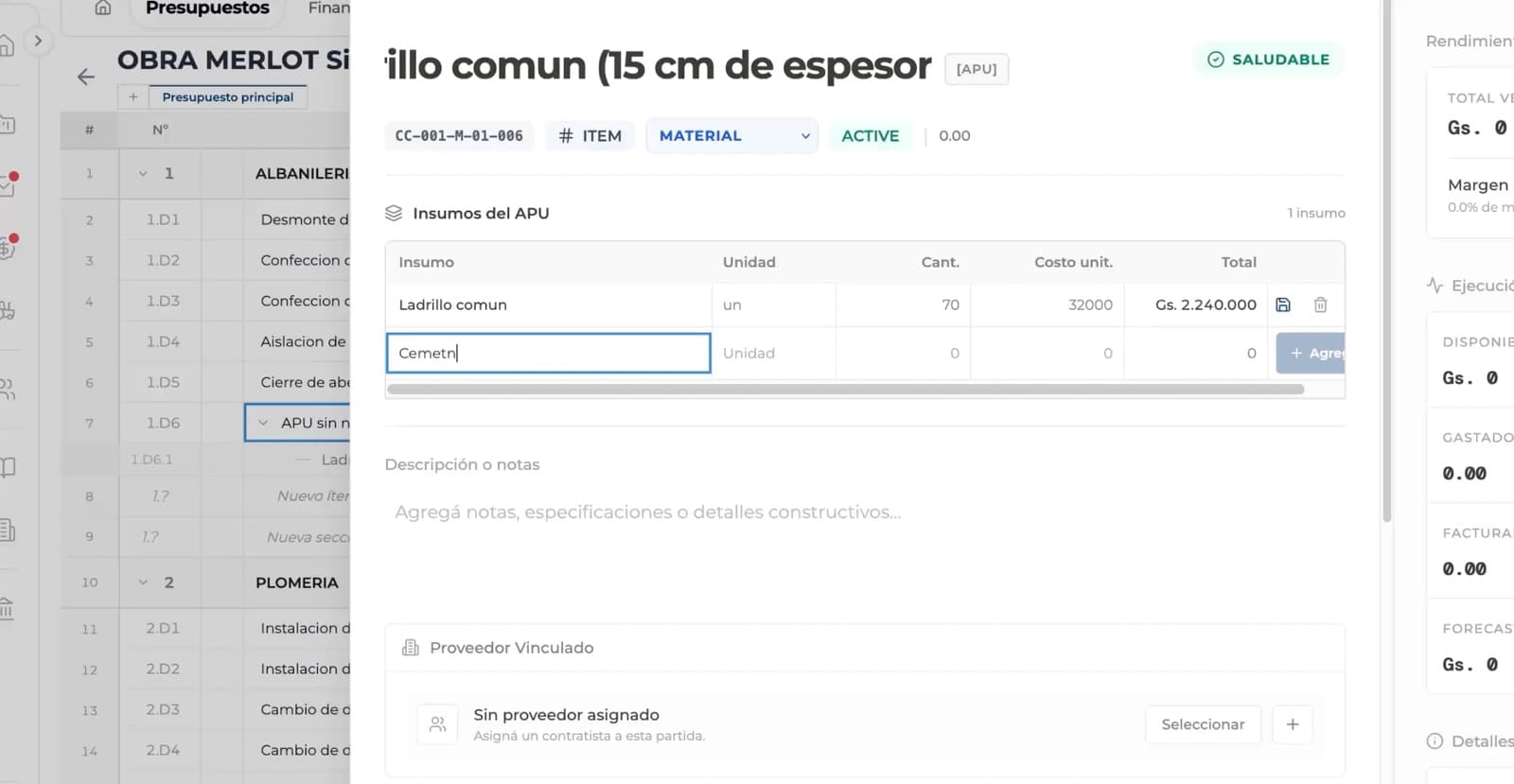
How to use: Unit price analysis
Add resources, yields and compositions from enabled catalogs. Perfour preserves the detail behind each unit price so the team can review, update and defend how the cost was built.
How to use: Client and internal exports
Export an internal PDF with operational detail or a clean client-facing presentation. Choose what to show while maintaining one source of truth, even when the way you communicate it changes.
How to use: Budget versus actual
Compare planned, committed, actual, certified and paid amounts. Links to purchasing, expenses and collections turn the budget into the job's live financial backbone—not a day-one snapshot.
How to use: Budget import
Import existing budgets and turn them into structured information without entering everything again. Review the mapping before confirming and retain traceability from day one.
How to use: Purchase order creation
Create an order using real project line items and balances. The origin of every commitment stays visible and the team avoids out-of-context purchasing.
How to use: Approval chain
Configure review steps by value or responsibility. Everyone knows when to act and the order preserves who approved, rejected or requested changes.
How to use: Supplier record
Attach company, contact, terms and documents to every order. Commercial history remains available to purchasing, field and finance.
How to use: Committed cost
As an order advances, the budget reflects the commitment. Compare approved, ordered and available amounts before making the next purchasing decision.
How to use: Order document
Turn the approved order into a consistent, shareable document. Operations and the PDF use the same record to prevent discrepancies.
How to use: Purchase reconciliation
Connect what was purchased with what was received, invoiced and paid. Find open balances or discrepancies without rebuilding history across systems.
How to use: Expense entry
Enter an expense from field or office with date, amount, supplier and owner. Information reaches the system before it gets lost in messages or paper.
How to use: Budget allocation
Link actual cost to a budget line and preserve its context. Teams can explain what consumed the money and how much remains available.
How to use: Approval workflow
Use clear states for drafts, pending, approved, paid or canceled expenses. Every transition preserves its owner and date for simple auditing.
How to use: Receipts and evidence
Attach invoices, receipts and evidence to the same record. Reviewers no longer search another channel to validate the expense.
How to use: Payment tracking
Track disbursements, reimbursements and open balances. Finance gets an operational cash-flow view without a parallel spreadsheet.
How to use: Project actual cost
Expenses feed the project budget and overview. Compare actual, committed and available amounts with current information.
How to use: Certificate creation
Select the line items included in progress and work from the same job cost structure. There is no need to rebuild codes, units or values in another spreadsheet.
How to use: Progress measurement
Record current-period and cumulative progress by line item. Perfour calculates balances and preserves contracted, previously certified and outstanding quantities.
How to use: Certificate evidence
Attach support, observations and documents to certified items. Approvers can understand what was completed without chasing information in other channels.
How to use: Approval workflow
Control draft, review, comments and approval in a traceable workflow. Every adjustment preserves owner, date and prior value.
How to use: Certificate export
Generate the formal document with period quantities, cumulative values, retainage and totals. The PDF comes from the same operating record the team reviewed.
How to use: Financial traceability
An approved certificate updates the financial view and can originate payments. From one budget item, trace what was completed, certified and finally disbursed.
How to use: Payment record
Start a disbursement from an approved order, expense or certificate. The payment preserves its reason and prevents financial movements without job context.
How to use: Payment allocation
Apply one or more disbursements against the same balance. Perfour keeps the original amount, paid amount and outstanding balance visible.
How to use: Payment receipt
Attach transfer confirmation, receipt or support directly to the payment. Finance and project teams review the same evidence without exchanging separate files.
How to use: Disbursement detail
Record when, how and by whom the disbursement was made. History makes every transition verifiable and questions faster to answer.
How to use: Payment reconciliation
Group movements by supplier, order or certificate to detect open balances and discrepancies. Every counterparty keeps a clear financial history.
How to use: Payment pipeline
Payments update budget and financial control without replacing their source expense or commitment. Distinguish approved, actual, certified and effectively paid values.
How to use: Task list
Create concrete tasks with description, priority and date. Teams stop interpreting scattered messages and work from a clear list of next steps.
How to use: Task owners
Assign each task to a person or team and make the next actor visible. Ownership stays clear until the item closes.
How to use: Priorities and dates
Filter urgent, overdue and upcoming work. Every user can focus on their work without losing sight of project commitments.
How to use: Task comments
Centralize questions, clarifications and decisions beside the open item that created them. Context does not disappear when ownership changes.
How to use: Task context
Link tasks with records, documents and project activities. An item preserves why it exists and which part of execution it affects.
How to use: Task activity
States, owners and comments form a verifiable story. Leadership can understand what advanced, what was blocked and when each change happened.
How to use: Gantt schedule
Organize packages, activities and milestones with day, week or month scales. The structure keeps the full plan visible without making updates cumbersome.
How to use: Dependencies and critical path
Connect predecessors and successors to understand what can start and what threatens the finish date. A change reveals its effect before it becomes a delay.
How to use: Baseline comparison
Save the baseline and compare it with the live schedule. Every reschedule remains explainable and teams measure drift without erasing history.
How to use: Progress updates
Record actual progress and updated dates with job context. Office and field share the same status without manual consolidation.
How to use: Earned value
Link activities to budget lines and compare completed work, elapsed time and expected cost. Progress no longer depends on perception.
How to use: Schedule health
Identify overdue activities, threatened milestones and critical-path changes. The schedule turns scattered signals into early decisions.
How to use: Project folders
Create nested folders for contracts, reports and deliverables. Teams can locate documents without relying on personal archives.
How to use: File uploads
Upload documents individually or in batches and see how each upload progresses before moving on.
How to use: File preview
Preview or download a file and review its available versions from the same record.
How to use: File organization
Reorganize files between folders, including in batches, while keeping the project structure current.
How to use: Document search
Use names, metadata and search to retrieve content quickly. A consistent structure scales with the project.
How to use: Shared files
Grant access to files or folders from another job, distinguish shared from owned content and revoke access when needed.
How to use: RFI creation
Create numbered RFIs with question, location, discipline and background. A structured request reduces back-and-forth from the start.
How to use: Ball-in-court
Ball-in-court shows which person or organization must respond. Ownership and due date remain visible until the request moves forward.
How to use: Response thread
Centralize clarifications, revisions and the final response in an auditable thread. The team executes from the same decision—even months later.
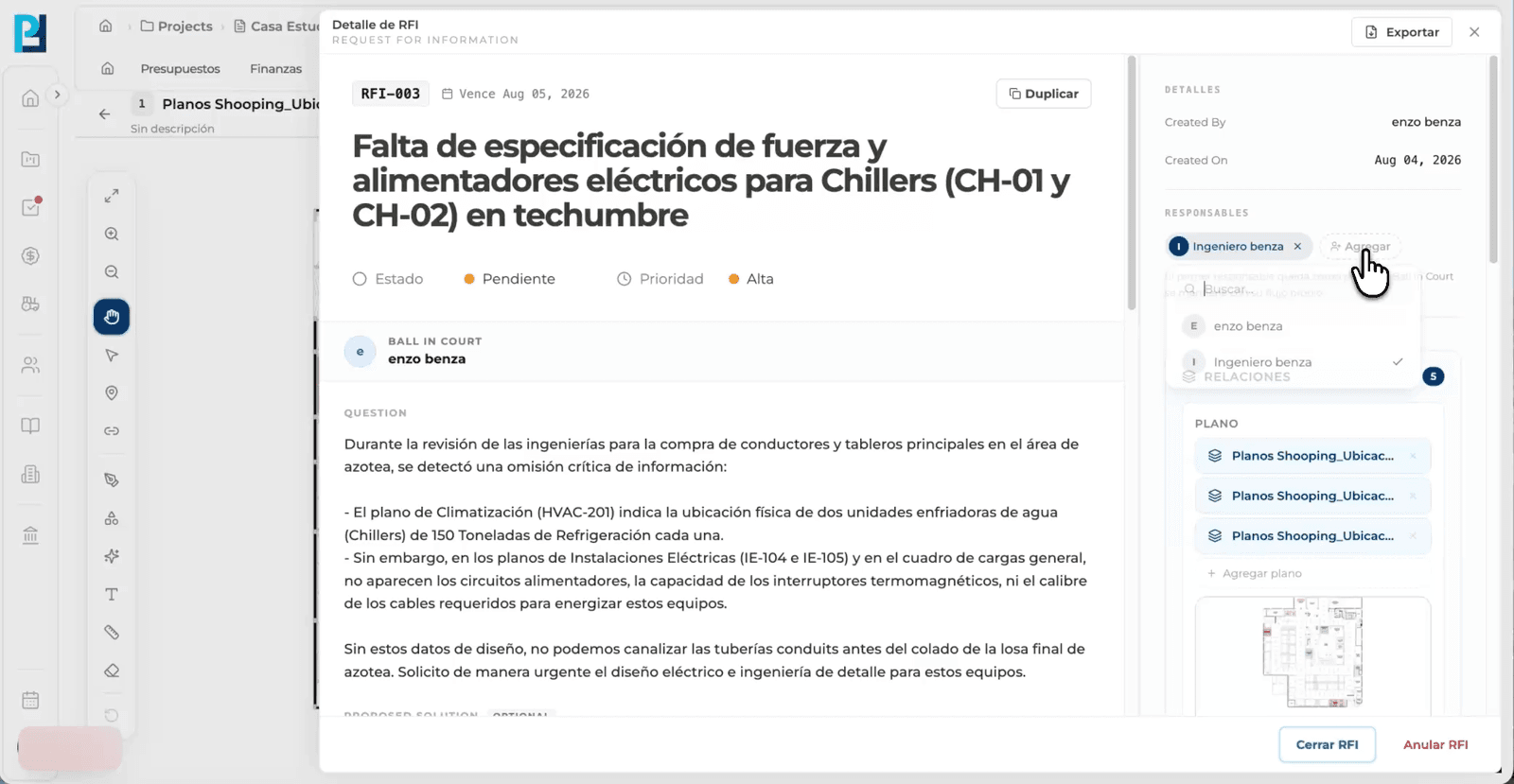
How to use: RFI documents
Attach relevant documents so the question can be resolved without external searching. Evidence remains linked to the RFI.
How to use: RFI deadlines
Notify participants, detect overdue RFIs and prioritize those blocking work. The dashboard turns an inbox of questions into a manageable process.
How to use: Cost and schedule impact
Record delay days and financial effect. The RFI connects to schedule, budget and execution to reveal its real consequence.
How to use: Inspection template
Create reusable templates by work type, discipline or phase. Every project applies the same criteria without rebuilding forms from scratch.
How to use: Field inspection
Run pass/fail checks where the work happens. Simple capture means more gets recorded with less later transcription.
How to use: Quality evidence
Add photos, notes and documents to the relevant check. A finding is explained and ready for review—not just a mark without context.
How to use: Nonconformity
When a check fails, create a nonconformity with owner, priority and due date. The issue enters a formal process until resolved.
How to use: Corrective action
Define required work, verify the correction and record closure. History shows what changed and who confirmed the standard was met.
How to use: Inspection traceability
Link findings to tasks, files and field records. The team understands where the issue happened and how it affected the job.
How to use: Submittal creation
Create the submittal with discipline, specification, owner and required date. Teams know from the start what to submit and when.
How to use: Review workflow
Define who prepares, reviews and responds. Responsibility moves visibly until the deliverable reaches a decision.
How to use: Document package
Attach technical documents, catalogs and files to the same record. Every reviewer works from the complete and correct package.
How to use: Approval status
Use consistent statuses and formal comments to document the response. Field teams know which material can be used and which needs revision.
How to use: Version history
When a submission returns with comments, create the next revision without erasing the prior one. The full sequence remains available for audit.
How to use: Submittal impact
Link the approved deliverable to files, controls and required dates. A late submittal reveals its impact before it blocks supply or execution.
How to use: Material catalog
Define materials with SKU, unit of measure and consistent description. Field, purchasing and administration refer to the same item.
How to use: Material receipt
Capture quantity, supplier, date and owner when materials arrive. The receipt is documented where it happens—not days later.
How to use: Material origin
Link receipts to project, supplier and purchase order. Teams can trace why every item arrived and against which commitment.
How to use: Quantity status
See planned and actual quantities to detect shortages or partial deliveries. The next decision starts with current data.
How to use: Receipt history
Open item detail to review quantities, dates, condition and notes for each delivery. The history explains how the received total was reached.
How to use: Pending delivery tracking
Compare expected, received and pending quantities from the table and item detail. Purchasing and field can coordinate the next delivery without rebuilding manual counts.
How to use: Daily log
Create a daily record with a consistent structure and location-based weather data. Teams capture what matters while it is still fresh.
How to use: Daily activity
Record labor, materials, equipment, completed work, delays, safety, visitors and notes. Each entry type preserves the detail it needs.
How to use: Field evidence
Attach photos and files to the day's events. The report becomes verifiable support instead of narrative alone.
How to use: Log approval
Supervision can validate the log before closing it. States and owners distinguish work in preparation from an official record.
How to use: Log history
Duplicate common structures and entries to speed up capture without losing precision. List, calendar and timeline views make every day easy to find.
How to use: Daily report PDF
Export the log to PDF for clients, leadership or archives. The same information feeds inventory receipts and the project's operating context.
How to use: Equipment record
Create the asset record with identification, category, status, base location and operating data. The same machine can be reviewed globally, by organization or by project.
How to use: Equipment assignment
Move equipment between base and projects while keeping each asset's location and assignment visible.
How to use: Equipment planning
Review planning to coordinate which equipment each project needs and avoid committing the same resource in two places.
How to use: Work orders
Create and complete maintenance work so the repair, owner and result remain attached to the asset.
How to use: Equipment rates
Preserve operating rates for each asset so planning and finance work from the same reference.
How to use: QR label
Generate a QR label to open the equipment record quickly and review its information from the field.
How to use: Input catalog
Record materials, labor and other resources with code, unit, price and classification instead of entering them again for every job.
How to use: Category tree
Use a category and folder tree to find resources and compositions even as the catalog grows.
How to use: Unit price template
Combine inputs, quantities and yields in APU templates that explain how every unit price is formed.
How to use: Price history
Review how an input's value and source evolved to update estimates with better context.
How to use: Commercial catalog
Connect items with suppliers and commercial catalogs to review alternatives from the same record.
How to use: Budget import
Select a catalog structure and import it into the budget without rebuilding every item manually.
How to use: Supplier record
Keep legal, commercial and company context in a profile shared by purchasing and finance.
How to use: Supplier contacts
Record people, roles, phone numbers and email so the relationship does not depend on someone's personal address book.
How to use: Commercial history
Review budgets, orders and related movements from the supplier view.
How to use: Supplier catalog
Connect offered products and prices to compare alternatives and reuse information in future purchasing.
How to use: Supplier onboarding
Use invitation and onboarding to incorporate the counterparty with the required information.
How to use: Supplier directory
Filter and review suppliers from one directory so the entire organization works with the same network.
How to use: Client record
Centralize company and commercial relationship data before connecting it to a job.
How to use: Client contacts
Keep people, roles, phone numbers and email to know who to consult or inform at every stage.
How to use: Client projects
Review which jobs belong to the same counterparty without searching separate systems.
How to use: Client communication
Start conversations from the company and keep communication close to the commercial record.
How to use: Data management
Edit the shared record so teams work with consistent information and avoid duplicate contacts.
How to use: Client history
The profile brings contacts, projects and activity together so the relationship does not depend on one person.
How to use: Project channel
Open project channels so coordination stays with the job. Teams reduce parallel chats and lost context.
How to use: Conversation threads
Separate discussions without fragmenting the team. A thread keeps the question, responses and resolution in one story.
How to use: Decision history
Decisions remain available with author and date. New participants can understand what was agreed without reconstructing conversations.
How to use: Mentions and alerts
Use mentions and notifications to direct attention without alerting the entire project. Everyone recognizes when they need to act.
How to use: Conversation files
Attach documents and evidence inside the exchange that created them. Content no longer travels separately from the decision.
How to use: Conversation search
Search previous conversations and preserve the complete history. Perfour turns daily coordination into reusable knowledge.